
Keep customer data secure during cobrowsing sessions by automatically masking sensitive information like credit card numbers, social security numbers, passwords, and other private data entered in form fields.
How Redaction Works
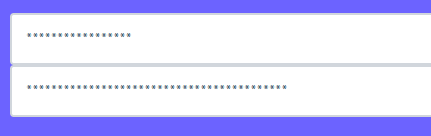
When redaction is enabled, all input field values are automatically obscured on the agent's screen during a cobrowse session. The customer sees their actual data, but the agent only sees asterisks (*). This ensures:
- Privacy Protection: Sensitive data never leaves the customer's device
- Compliance: Helps meet PCI-DSS requirements for handling payment information
- Trust: Customers can enter sensitive information without concern
Enable Redaction
To enable automatic redaction, add the maskAllInputfields parameter when initializing the Blitzz Cobrowse SDK:
<script>
  let blitzz;
  let st = document.createElement("script");
  st.src = "https://media.blitzz.co/sdk/blitzzcobrowse.min.js";
  st.async = 1;
  let tx = document.getElementsByTagName("script")[0];
  tx.parentNode.insertBefore(st, tx);
  st.onload = function () {
    if (!blitzz) {
      blitzz = new BlitzzCobrowse({});
      blitzz.initialize({
        license: "your-license-key",
        maskAllInputfields: true  // Redacts all input field values
      });
    }
  };
</script>
Result
Once enabled, all input field values appear as asterisks (*) on the agent's screen:
Use Cases
| Industry | Protected Data |
| Financial Services | Account numbers, SSN, credit card details |
| Healthcare | Patient IDs, medical record numbers, insurance info |
| E-Commerce | Payment details, billing addresses, passwords |
| Insurance | Policy numbers, SSN, claim details |
Need Help?
For assistance with implementing redaction or other Cobrowse SDK features, please contact our support team.