
Integrate Blitzz Video Sessions with Your CRM, Ticketing, or Business System
Streamline your workflow by launching Blitzz video sessions directly from your existing business systems. Whether you're using a CRM, ticketing platform, permit management system, or field service software, this URL parameter integration allows your team to start video sessions with pre-filled customer information—eliminating manual data entry and reducing errors.
This integration is ideal for:
- Remote Support Teams: Launch video support calls directly from your helpdesk or ticketing system
- Field Service Operations: Connect technicians with customers for remote diagnostics and guidance
- Building & Permit Inspections: Start virtual inspections from your permit management software
- Insurance Claims: Initiate video assessments from your claims management platform
- Sales & Customer Success: Begin product demos or onboarding calls from your CRM
How It Works
When a user clicks a button or link (e.g., "Start Video Session") in your system, Blitzz opens in a new browser tab with the session details automatically populated. The user simply clicks "Invite and Join" to start the call.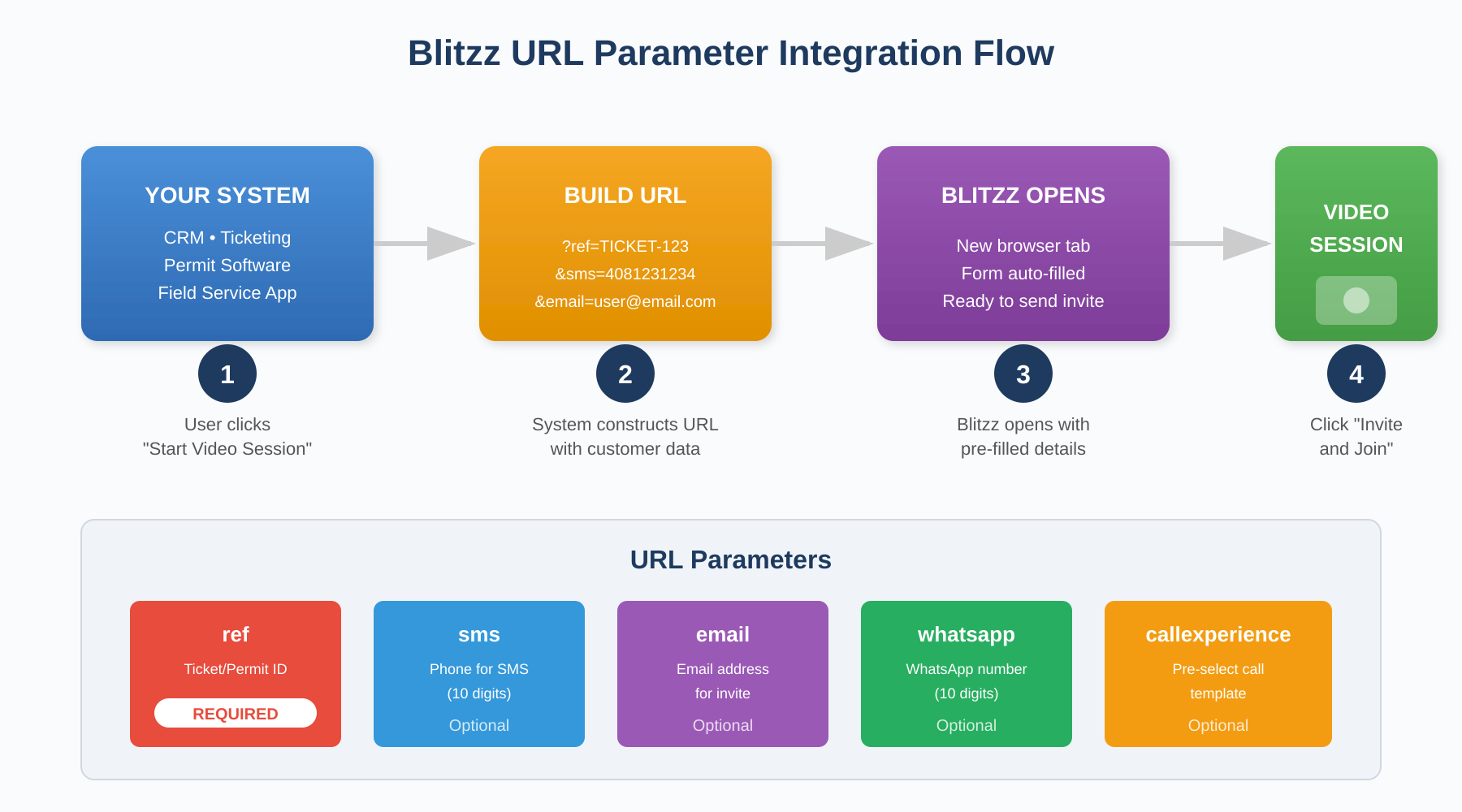
Benefits
- Fewer Clicks: Launch video sessions without switching between applications
- Reduced Errors: Auto-fill customer data from your system—no manual typing required
- Improved Productivity: Keep everything in one view during the call
- Better Reporting: Automatically link Blitzz sessions to tickets, permits, or cases for tracking and ROI analysis
Authentication Requirements
This integration requires the host to be logged into their Blitzz account. If not logged in, they will be prompted to sign in before the session is created.
For a seamless experience, we recommend setting up Single Sign-On (SSO) for your organization. Contact our support team to configure SSO for your domain.
URL Structure
Use the following URL template to create links that auto-fill session information:
https://[your-domain].blitzz.co/createsession?ref=[reference_id]&sms=[phone_number]&email=[email_address]&whatsapp=[phone_number]&callexperience=[experience_name]
Replace [your-domain] with your Blitzz subdomain (e.g., acme.blitzz.co).
URL Parameters Reference
| Parameter | Description | Required |
| ref | Your unique identifier such as ticket ID, permit number, case number, or work order. This field cannot be edited by the host after the session is created. | Yes |
| sms | Customer's phone number for SMS invite. Use 10 digits without country code (e.g., 4081231234). | No |
| Customer's email address for email invite. | No | |
| Customer's WhatsApp number. Use 10 digits without country code (e.g., 4081231234). | No | |
| callexperience | Pre-select a specific call experience or template. Leave blank to let the host choose at invite time. | No |
Note: Country codes are domain-specific. Blitzz uses the default country setting configured for your domain.
Examples
Basic session with reference ID only:
https://acme.blitzz.co/createsession?ref=TICKET-12345
Session with SMS invite:
https://acme.blitzz.co/createsession?ref=TICKET-12345&sms=4081231234
Session with email invite:
https://acme.blitzz.co/createsession?ref=TICKET-12345&email=customer@example.com
Session with multiple contact options:
https://acme.blitzz.co/createsession?ref=TICKET-12345&sms=4081231234&email=customer@example.com
Handling Special Characters
If your reference ID or other parameters contain special characters, make sure to URL-encode them. Most programming languages have built-in functions for this:
- JavaScript:
encodeURIComponent(value) - Python:
urllib.parse.quote(value) - PHP:
urlencode($value) - C#:
Uri.EscapeDataString(value)
Sample Implementation (JavaScript)
function launchBlitzzSession(referenceId, phone, email) {
  const baseUrl = "https://yourdomain.blitzz.co/createsession";
  let url = baseUrl + "?ref=" + encodeURIComponent(referenceId);

  if (phone) {
    url += "&sms=" + encodeURIComponent(phone);
  }
  if (email) {
    url += "&email=" + encodeURIComponent(email);
  }

  window.open(url, "_blank");
}

// Example usage:
launchBlitzzSession("TICKET-12345", "4081231234", "customer@example.com");
Testing Your Integration
Before deploying to production, we recommend testing your integration in a sandbox environment. This allows your team to verify the URL construction and session creation without affecting live data.
Implementation Effort Estimate
| Skills Required |
|
| Development Time | Approximately 10-20 hours (varies based on your system's complexity and change management requirements) |
| QA & Testing | 1-2 hours for basic testing in your environment |
| Documentation & Training |
|
Need Help?
Our team is here to support your integration. If you have questions or need assistance, please submit a support ticket and we'll be happy to help!