
If you are using Safari on a Mac and Blitzz reports are not appearing or loading correctly, the issue may be caused by a Safari privacy setting that blocks certain content from loading. To ensure full functionality when accessing reports, you must disable the Cross-Site Tracking prevention setting in Safari.
How to Disable “Prevent Cross-Site Tracking” in Safari
- Open Safari on your Mac.
- Click Safari in the top menu bar and select Settings.
- Go to the Privacy tab.
- Uncheck “Prevent cross-site tracking”.
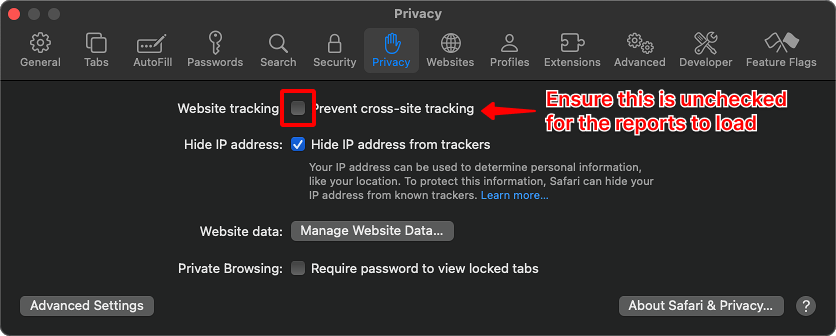
Once this setting is disabled, refresh your browser and try loading the report again. The content should now display properly.